Android: keystore, signing, and testing without a Play Store account
A Google Play developer account costs money and requires a review that can take a while. In the meantime, you still need to get a build in front of real people on real phones. Here’s how we set that up for Foodproof, with the honest history of CI errors we fixed one by one.
Signing, locally
In android/app/build.gradle, the signing config reads its values from Gradle properties instead of hardcoding them:
signingConfigs {
    release {
        if (project.hasProperty('FOODPROOF_RELEASE_STORE_FILE')) {
            storeFile file(FOODPROOF_RELEASE_STORE_FILE)
            storePassword FOODPROOF_RELEASE_STORE_PASSWORD
            keyAlias FOODPROOF_RELEASE_KEY_ALIAS
            keyPassword FOODPROOF_RELEASE_KEY_PASSWORD
        }
    }
}
Those four properties live in android/gradle.properties, which is gitignored (same for *.keystore files). The key alias is simply foodproof. Nothing fancier than that: just a file that must never end up in git.
The CI: the real history of errors
We run a GitHub Action that builds the release APK and pushes it to Firebase App Distribution on every push to main that touches src/, android/, or the dependency files. The pipeline decodes the keystore and google-services.json from base64 secrets, writes android/gradle.properties on the fly, then runs ./gradlew assembleRelease.
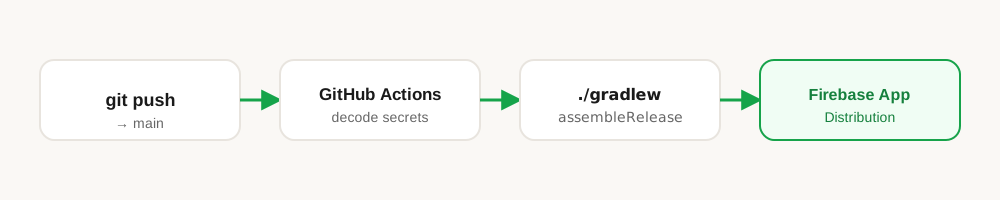
What follows is the actual order the problems showed up in, not a cleaned-up version written after the fact:
1. An incomplete generated gradle.properties. The very first version of the workflow wrote the four signing properties but forgot hermesEnabled=true. The build passed locally (where the full file already exists) and broke in CI. Fix: generate a complete gradle.properties in the workflow, with every flag Gradle actually needs, not just the signing-related ones.
2. Out of memory on bundleRelease. Default GitHub Actions runners don’t have enough RAM for a React Native Gradle build with Hermes enabled. Fix: bump the Gradle heap to 4GB on CI.
org.gradle.jvmargs=-Xmx4g -XX:MaxMetaspaceSize=512m -XX:+HeapDumpOnOutOfMemoryError3. Timeout exceeded. Once the OOM was fixed, the whole build still went over the allotted time. We restricted compilation to arm64-v8a only (no need to build every architecture for an internal distribution test) and bumped the job timeout to 60 minutes.
4. The keystore came out corrupted after decoding. The hardest one to debug: the keystore decoded in CI didn’t match the one encoded locally. The cause: base64 on macOS inserts line breaks in its output, which GitHub Actions doesn’t decode the same way. The fix is re-encoding it properly:
base64 -i ~/foodproof-release-key.keystore | tr -d '\n' | pbcopy5. AAB vs APK. Firebase App Distribution expects an AAB (Android App Bundle) if you want to go through the “linked to Play Store” path, but we don’t have a Play account. Fix: build a plain APK (assembleRelease instead of bundleRelease) and upload it directly, skipping Play entirely.
6. The wrong group name. Firebase App Distribution didn’t return a clear error when the tester group name didn’t exactly match what was configured in the Firebase Console. After wasting time looking elsewhere, the fix was trivial: the group name was simply misspelled in the YAML.
7. Triggering at the right time. Last adjustment: only re-run the distribution job when actual source code changes, not on every README or docs edit.
Small honest confession: the job name in the YAML still says “Build AAB & Distribute to Testers”, even though it’s been building an APK since fix number 5. A real leftover we haven’t renamed yet.
The full workflow
Here’s the actual file, as it runs today after every fix above (.github/workflows/firebase-distribution.yml):
name: Android — Firebase App Distribution

on:
  push:
    branches: [main]
    paths:
      - "src/**"
      - "android/**"
      - "package.json"
      - "package-lock.json"
  workflow_dispatch:
    inputs:
      release_notes:
        description: "Release notes (shown to testers)"
        required: false
        default: "New build available"

jobs:
  build-and-distribute:
    name: 🤖 Build AAB & Distribute to Testers
    runs-on: ubuntu-latest
    timeout-minutes: 60

    steps:
      - name: 📥 Checkout code
        uses: actions/checkout@v4

      - name: 📦 Setup Node.js
        uses: actions/setup-node@v4
        with:
          node-version: "20"
          cache: "npm"

      - name: 🔧 Install npm dependencies
        run: npm ci

      - name: ☕ Setup Java 17
        uses: actions/setup-java@v4
        with:
          distribution: "temurin"
          java-version: "17"
          cache: "gradle"

      - name: 🔐 Decode keystore
        run: |
          echo "${{ secrets.ANDROID_KEYSTORE_BASE64 }}" | tr -d ' \n' | base64 -d > android/app/foodproof-release-key.keystore

      - name: 🔑 Decode google-services.json
        run: |
          echo "${{ secrets.GOOGLE_SERVICES_JSON_BASE64 }}" | base64 -d > android/app/google-services.json

      - name: 📝 Create gradle.properties
        run: |
          cat > android/gradle.properties << EOF
          org.gradle.jvmargs=-Xmx4g -XX:MaxMetaspaceSize=512m -XX:+HeapDumpOnOutOfMemoryError
          android.useAndroidX=true
          android.enableJetifier=true
          hermesEnabled=true
          newArchEnabled=true
          reactNativeArchitectures=arm64-v8a
          FOODPROOF_RELEASE_STORE_FILE=foodproof-release-key.keystore
          FOODPROOF_RELEASE_STORE_PASSWORD=${{ secrets.ANDROID_KEYSTORE_PASSWORD }}
          FOODPROOF_RELEASE_KEY_ALIAS=${{ secrets.ANDROID_KEY_ALIAS }}
          FOODPROOF_RELEASE_KEY_PASSWORD=${{ secrets.ANDROID_KEY_PASSWORD }}
          EOF

      - name: 🏗️ Build release APK
        run: cd android && ./gradlew assembleRelease --no-daemon

      - name: 🚀 Upload to Firebase App Distribution
        uses: wzieba/Firebase-Distribution-Github-Action@v1
        with:
          appId: ${{ secrets.FIREBASE_ANDROID_APP_ID }}
          serviceCredentialsFileContent: ${{ secrets.FIREBASE_SERVICE_ACCOUNT_JSON }}
          groups: friends-&-family
          file: android/app/build/outputs/apk/release/app-release.apk
          releaseNotes: ${{ github.event.inputs.release_notes || format('Build {0} — {1}', github.run_number, github.sha) }}

      - name: 📦 Upload APK artifact
        uses: actions/upload-artifact@v4
        if: always()
        with:
          name: app-release-apk
          path: android/app/build/outputs/apk/release/app-release.apk
          retention-days: 30

      - name: 🧹 Cleanup secrets
        if: always()
        run: |
          rm -f android/app/foodproof-release-key.keystore
          rm -f android/app/google-services.json

      - name: ✅ Distribution successful
        run: echo "✓ Android build distributed to Firebase testers!"
Seven secrets need to be configured in the GitHub repo settings (Settings → Secrets and variables → Actions) for this to run: ANDROID_KEYSTORE_BASE64, ANDROID_KEYSTORE_PASSWORD, ANDROID_KEY_ALIAS, ANDROID_KEY_PASSWORD, FIREBASE_ANDROID_APP_ID, FIREBASE_SERVICE_ACCOUNT_JSON, GOOGLE_SERVICES_JSON_BASE64. And yes, the job name on line 20 still says “Build AAB” as mentioned earlier, copy-pasting this file will reproduce that small lie on your end too.
What you end up with
A push to main that touches the code automatically triggers a signed build, distributed to a tester group through the Firebase App Distribution app, without ever touching the Play Store. For a solo project that just needs a handful of people testing an Android build before paying Google’s fees, that’s more than enough.